11. Case 07: Fall-arrest Cutebot
11.1. Purpose
- The Cutebot reverses quickly when detecting the edge of a table and goes forward after making a turn.
11.4. Programming
Step 1
- Click the “Advanced” to see more choices in the MakeCode drawer.
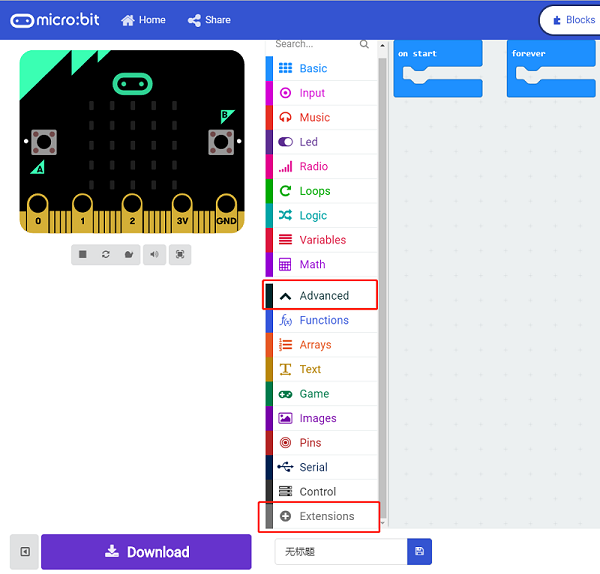
- A codebase is required for Cutebot programming, click “Add Package” at the bottom of the drawer, search
[Cutebot](https://shop.elecfreaks.com/products/elecfreaks-micro-bit-smart-cutebot-kit-without-micro-bit-board?_pos=1&_sid=4c6909119&_ss=r)in the dialogue box and download it.

Note: If you met a tip indicating incompatibility of the codebase, you can continue with the tips or build a new project there.
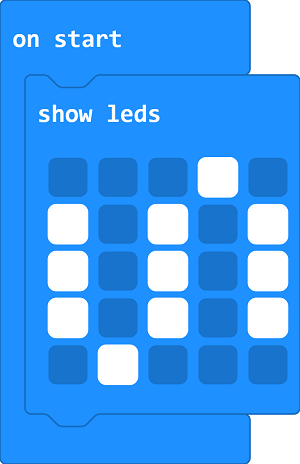
Step 3
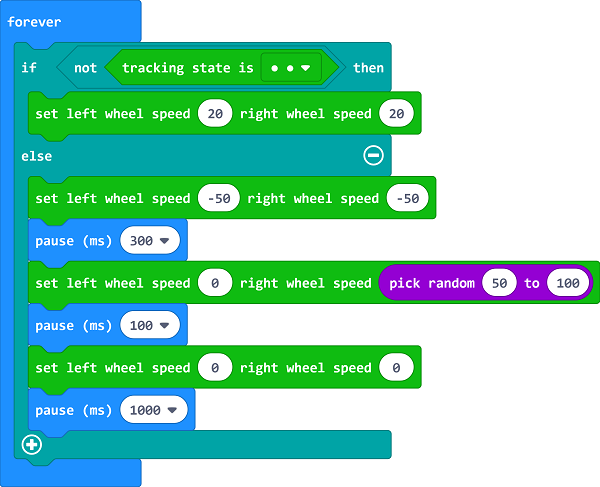
- Drag
ifbrick intoforeverbrick and judge if both of the line-tracking sensors are detecting the edges of the black line, then set the right wheel speed to20. - If not, set the speed of both wheels as
-50to reverse, pause300msand keep the left wheel still but the right wheel moves at a random speed from 50~100 and lasts 100ms. - Set the speed of both wheels to 0 and pause 1s to move forward again.
Programming
Links: https://makecode.microbit.org/_2z1hh4iEUgTY
You can also download it directly below:
11.5. Result
- The Cutebot reverses quickly when detecting the edge of a table and goes forward after making a turn.